Tuesday, March 1, 2022

HOW YOU CAN SEE INCOMING USPS MAIL VIA AN EMAIL

USPS INFORMED DELIVERY ~ Receive FREE Mail Delivery Notices On Your iPHONE and/or Your MAC & PC…. BOB SKIDMORE CORRESPONDENT © 2022 BOB SKIDMORE ALL RIGHTS RESERVED (Please note that Google’s BlogSpot, the provider we use to publish this monthly column, has changed the allowable format style. So, if the column’s format looks a bit strange it’s due to Google and BlogSpot, not THE GADGETEER.) Here’s a FREE SERVICE from the United States Postal Service (USPS) that lets you know what mail is being delivered to your USA residential address today, or the next business day, whichever applies based on normally serviced, non-holiday, days of delivery. A business address is not eligible unless it’s your home address. Once you’ve signed up and activated this feature, you’ll receive images of the First-Class Mail coming to your address as well as a notice of any parcels scheduled for delivery that same day. Note that this is not name sensitive, but rather by the registered address used when you applied for the service. In other words, almost anything scheduled to come to your address no matter to whom it’s addressed to will be shown. It’s really easy to apply. Simply access the INFORMED DELIVERY WEB SITE at: https://bit.ly/3tRnr4k. Be careful to follow each registration step as the instructions can be a slight bit misleading, or confusing, a common phenomenon with many government sites and documents. The designers of many web related sites assume everyone is a tech guru like them and thus understands what they’re saying in a very condensed form. Lol! Once you’re informed by an acceptance of service email that you are successfully registered you can expect your daily notifications to begin within a couple of business days thereafter. As an Informed Delivery client, you can view and manage your scheduled mail and parcel delivery for that day on your computer, iPad or Smartphone. You’ll receive Informed Delivery email notifications that show you what incoming mail you have being delivered that day. Simply use the Informed Delivery dashboard, or mobile app to monitor your delivery status, reschedule deliveries and much, much more. Informed Delivery lists what’s coming to your mailbox, anytime, anywhere, even when you’re traveling. If you don’t have any mail or packages scheduled to be delivered that day no email notification to that affect will be sent to you, however, junk mail and magazines may still arrive. As I stated notifications are geared towards First-Class Mail only, so junk mail and magazines are not listed even though they’re being delivered that same day. I find INFORMED DELIVERY to be about 95% accurate and thus can be a useful tool, especially if you have a second residence. Receiving this type of information from second residences would require a completely new registration, as though you were first signing up for the service, since the address is different. Note, such registration is only necessary if you want the same information available for mail coming to that different address. I wish they would add a notification as to when delivery of the posted items were actually in your mailbox. Maybe that’s something planned for the future? We can at least hope so!
Another USPS feature and site that could be useful for many people is TRACKING PLUS at: https://bit.ly/3rIgorW. This feature is not free and can cost as much as $10 per item being tracked depending on the length of time you select to track a particular package. The cost varies on the individual parcel size and the length of tracking time you select for that parcel and could be for up to ten years. This can be a useful tool for lost or delayed shipments? Check out some of the other unique services available too. Hats off to the USPS for using technology to help us know more about our mail! GADGETEER’s RATING: ★★★★★ MSRP: $0.00 For more information go to: https://bit.ly/3FU5Lai Tech Support: 800.344.7779 Graphic credits: Google Images Bob Skidmore is a freelance writer, who may be contacted at bob.thegadgeteer.skidmore@gmail.com, or followed at twitter.com/bskidmore for the latest gadget industry news. He does not represent, or endorse any of the products he reviews and his opinions are solely his points of view and not those of the manufacturer, or any legal resource. The manufacturer generally supplies products and press releases at no cost for the articles and no other compensation is received. THE GADGETEER is highly selective as to products he feels worthy of review so as not to waste the reader’s time, thus the reason for many superior ratings. ## Check out Bob’s Twitter page for up to the minute gadget news. Available at: https://twitter.com/bskidmore

Tuesday, February 1, 2022

CES 2020 ~ A Car That Can Change Body Color

CES 2022 ~ BMW’s Color Changing Concept Car
BOB SKIDMORE CORRESPONDENT © 2022 BOB SKIDMORE ALL RIGHTS RESERVED Traditionally CES, THE CONSUMER ELECTRONICS SHOW, is held each year in Las Vegas, Nevada. It typically hosts thousands of eager manufacturers, distributors and dealers looking to display the latest in electronic gadgets that may appear in your local stores throughout the year. Canceled last year due to Covid, it reappeared in a scaled down version at the LV Convention Center even though a vast number of exhibitors opted for some form of virtual exposure, or simply became no shows. Attendance was only 40,000 compared to previous years of up to 200,000. Perhaps the most interesting and innovative presentation was from BMW, the well-known automobile manufacturer. Yes, in recent years car manufacturers have found CES to be a novel way to test the waters and see what electronic gadgets and features people would like them to include in their future models. BMW is no exception to this trend. They displayed the BMQ iX Flow, a concept car that changes colors at the push of a button. Yes, it can change from white for hot days, to black on cold ones.
The body is laminated with an electrophoretic film containing microcapsules that are the diameter of a human hair. Each capsule contains differently charged white, black, or colored particles which become visible when an electronic field is applied. This creates what is known as an Electronic Paper Display, EPD. This could become a viable option allowing you to match the color of the car to your mood, or color coordinate with what you are wearing as well as affecting the climate in your car in an energy saving manor. I should mention that the iX series itself is presently available from BMW in other models including an electric version. The Flow is just a concept at this particular time. Could it become the wave of the future? Possibly! Graphic credits: The Gadgeteer & Google Images Bob Skidmore is a freelance writer, who may be contacted at bob.thegadgeteer.skidmore@gmail.com, or followed at twitter.com/bskidmore for the latest gadget industry news. He does not represent, or endorse any of the products he reviews and his opinions are solely his points of view and not those of the manufacturer, or any legal resource. The manufacturer generally supplies products and press releases at no cost for the articles and no other compensation is received. THE GADGETEER is highly selective as to products he feels worthy of review so as not to waste the reader’s time, thus the reason for many superior ratings. ## Check out Bob’s Twitter page for up to the minute gadget news. Available at: https://twitter.com/bskidmore

Saturday, January 1, 2022

LOGITECH K750 - A Solar Powered Keyboard For Mac & PC

BOB SKIDMORE CORRESPONDENT © 2021 BOB SKIDMORE ALL RIGHTS RESERVED LOGITECH K750 ~ Solar Powered Keyboard for MAC or PC (Please note that Google’s BlogSpot, the provider we use to publish this monthly column, has changed the allowable format style. So, if the column’s format looks a bit strange it’s due to Google and BlogSpot, not THE GADGETEER.) Are you looking for a wireless keyboard for your computer? How about if it’s also being solar powered? The Logitech K750 may be just the perfect solution and is available in both MAC & PC operating system configurations. This gem *never needs batteries since it gets its power from the Sun, or any exterior light source. It has all the keys you are accustomed to in your wired MAC or PC keyboard. A solar app is even available as a download that allows you to easily monitor the energy supply status. Simply Google Logitech Solar App and then select the proper operating system for a download link.
No special software is required. Be sure to insert the tiny USB Unifying Receiver into an available USB port and switch the keyboard’s OFF/ON button located at the top right, ON, and you’ll be connected. Since there’s no cable connection you can easily move it around, or place it in your lap. It’s that simple and convenient to operate. Earlier I mentioned that that *no battery replacement is required since it utilizes Solar power to recharge the internal Maxell ML2032R button battery. Note, that the R in the battery number signifies that this battery is a rechargeable one, unlike its counterpart, the CR2032 that is not rechargeable and can’t be used. You should get 2 – 3 years of recharging capability at which point it will need to be replaced. Logitech offers no information as to replacement, however, it is possible. Flip the keyboard over and you’ll notice an indentation for a battery tray that holds the ML2032R. Take a jeweler’s flat edge screwdriver and work it out.
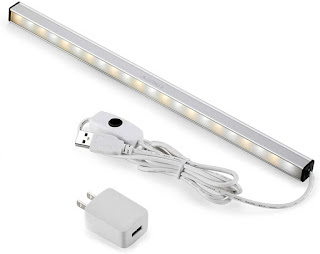
Yes, it does come out with a little bit of effort. Once replaced you should be back to normal operation. It’s interesting that Logitech offers no information on battery replacement. Guess they want you to purchase a new keyboard? If there’s any negative aspect to this product that’s probably it. TIP: If you operate this keyboard in a dark area you may wish to install a small LED strip light near the keyboard that can be easily accessed for charging when the keyboard is not it use: I have a slide out tray for my keyboard, so I’ve installed the LED strip above it. I just reposition the tray with keyboard so the LEDs make visible contact with the black charging panel at the top of the keyboard and illuminate when needed.
GADGETEER’s RATING: ★★★★★ COST: $99.99 For more information go to: https://amzn.to/3AaW2dI Available at Retail, Amazon and other on-line retailers. Graphic credits: Amazon & The Gadgeteer Bob Skidmore is a freelance writer, who may be contacted at bob.thegadgeteer.skidmore@gmail.com, or followed at twitter.com/bskidmore for the latest gadget industry news. He does not represent, or endorse any of the products he reviews and his opinions are solely his points of view and not those of the manufacturer, or any legal resource. The manufacturer generally supplies products and press releases at no cost for the articles and no other compensation is received. THE GADGETEER is highly selective as to products he feels worthy of review so as not to waste the reader’s time, thus the reason for many superior ratings. ## Check out Bob’s Twitter page for up to the minute gadget news. Available at: https://twitter.com/bskidmore

Wednesday, December 1, 2021

WeGuard Antenna ~ A Backup For TV Reception When Cable Fails

WeGuard ~ A Backup for TV Reception When Cable Fails…. (Please note that Google’s BlogSpot, the provider we use to publish this monthly column, has changed the allowable format style. So, if the column’s format looks a bit strange it’s due to Google and BlogSpot, not THE GADGETEER.) BOB SKIDMORE CORRESPONDENT © 2021 BOB SKIDMORE ALL RIGHTS RESERVED If you’re a cable user you receive various broadcast channels via cable, or Roku, or even Apple TV via the Internet. What happens if and when your cable and Internet has an unexpected outage? Perhaps simply a local outage, or the result of a weather-related disturbance such as a hurricane. Did you know there’s a way to receive some broadcast channels by simply selecting TV in your input menu of your flat screen. To do this you need to take a few steps to prepare for such an outage. I’ve tested the WeGuard Indoor HDTV Antenna, an omnidirectional device that allows your TV to receive some local TV channels. This small antenna can be placed next to your TV, or for better results, on a window sill. Once plugged into the TV’s RF antenna jack and the USB power lead into a small USB power adapter, not supplied, you’re ready for the next step, programming your TV to accept the newly installed antenna. When the antenna input is selected, you’ll find another menu that asks you if you would like to auto-select broadcast stations that transmit their digital signals over the airwaves in your area, so press yes. The number of stations you can receive in this mode will depend on several factors. If you have obstacles, concrete walls and large outdoor objects in the way they may hinder the TV’s ability to program in these channels. Considering that receiving some programming is better than none when cable service fails the WeGuard Antenna could be an inexpensive and easy solution. Remember that not all stations you’re accustomed to viewing can be received. This means that some networks like ABC, NBC, CBS and PBS may, or may not be available if you can’t receive their affiliate station’s transmission. Services like CNN, FOX NEWS, CNBC, THE WEATHER CHANNEL, HBO and SHOWTIME do not have local transmitters and thus will not be available at all. So, it’s easy to see how an indoor antenna like the WeGuard can provide an easy backup during a cable outage. Something is better than nothing! It’s easy to install at very little cost and it works! GADGETEER’s RATING: ★★★★★ MSRP: $19.99 Available at retail or no-line. For more information go to: https://amzn.to/32JpNnn Graphic credits: Amazon Bob Skidmore is a freelance writer, who may be contacted at bob.thegadgeteer.skidmore@gmail.com, or followed at twitter.com/bskidmore for the latest gadget industry news. He does not represent, or endorse any of the products he reviews and his opinions are solely his points of view and not those of the manufacturer, or any legal resource. The manufacturer generally supplies products and press releases at no cost for the articles and no other compensation is received. THE GADGETEER is highly selective as to products he feels worthy of review so as not to waste the reader’s time, thus the reason for many superior ratings. ## Check out Bob’s Twitter page for up to the minute gadget news. Available at: https://twitter.com/bskidmore

Monday, November 1, 2021

SALT REMOTE ~ A Remote That Should Have Come With Apple TV

SALT REMOTE ~ A Remote That Should Have Come With Apple TV (Please note that Google’s BlogSpot, the provider we use to publish this monthly column, has changed the allowable format style. So, if the column’s format looks a bit strange it’s due to Google and BlogSpot, not THE GADGETEER.) BOB SKIDMORE CORRESPONDENT © 2021 BOB SKIDMORE ALL RIGHTS RESERVED In a previous column I reported on the included remote for the Apple TV 4K/HD device. As mention in the article the remote that Apple supplies with this product leaves a lot to be desired. They added a track pad feature that mimics what you find on many laptops. While useful on a laptop it is very clumsy operationally on a remote. This is the case with the one supplied with Apple TV. SALT by TW Electronics has manufactured what I would consider to be a giant leap forward in making the Apple TV remote experience much easier and efficient. It even can control your TV and comes preprogrammed for most Samsung flat screens. You will immediately notice that the control buttons are similar to those found on traditional remotes. Let’s take a look.
(1) Power on/off: With this button, you can turn your TV on and off. A long press of this button, more than two seconds, allows you to switch off the Apple TV only, unless the CEC is activated. In that case your TV will be turned off as well. (CEC is short for HDMI Consumer Electronics Control and is an HDMI feature many TVs and peripherals have. This feature makes your devices work better together, but is often disabled by default.) (2) MENU: This button is used to activate hidden options of a page. It also allows you to return to the previous screen. Furthermore, you can use this button to turn on your Apple TV when it is off. A long press on the MENU button allows you to return to the Apple TV home screen. (3) NAVIGATION ARROWS: With the four navigation arrows, you can navigate through the screens and select the icons of the services you want to utilize. The top arrow activates the channel carrousel. They are all sorted by category, and you will also find your favorite selections. The down arrow activates the player’s option menu when you watch TV so you can access advanced features such as info, controls and audio. (4) OK: The OK button confirms the entry in the menu corresponding to the icon on which the cursor is pointing. (5) P a/v: These buttons allow you to switch to the upper or lower program when the user is watching a live TV program. If the program is not live, you will have to confirm that you desire to return to live TV before switching. (6) VOLUME: Volume up/down allows you to increase or decrease your TV’s volume. (7) MUTE: Mutes the sound of your TV. By pressing again you can reinstate the sound. (8) FAST FORWARD: This button allows you fast-forward a program not on live TV. A second press will accelerate the forwarding. A third press will return to normal play mode. You can also return to the play mode by pressing the play button. (9) FAST REWIND: This button allows you to rewind a program. A second press will accelerate the rewinding. A third press will return to the normal playback mode. You can also return to normal play mode by pressing the play button. (10) SKIP FORWARD. Permits you to skip part of the program by jumping forward. (11) SKIP BACK: Allows you to skip part of the program by jumping backwards. (12) PAUSE PLAY: Allows you to interrupt a program. Pressing it again will resume the program from where you paused it. (13) STOP: Allows you to stop a running program. As you can quickly see the Swiss made SALT remote runs circles around the Apple one! Its ease of operation puts you back in direct control without the use of your finger attempting to properly track, or depress what functions you wish to activate. I should mention that while I tested the SALT model of this style remote other brands are out there and some may have slightly different buttons and configurations, but work in much the simplistic same manner. GADGETEER’s RATING: ★★★★★ MSRP: $65.00 For more information go to: https://amzn.to/2JFfr1b Graphic credits: Google Images Bob Skidmore is a freelance writer, who may be contacted at bob.thegadgeteer.skidmore@gmail.com, or followed at twitter.com/bskidmore for the latest gadget industry news. He does not represent, or endorse any of the products he reviews and his opinions are solely his points of view and not those of the manufacturer, or any legal resource. The manufacturer generally supplies products and press releases at no cost for the articles and no other compensation is received. THE GADGETEER is highly selective as to products he feels worthy of review so as not to waste the reader’s time, thus the reason for many superior ratings. ## Check out Bob’s Twitter page for up to the minute gadget news. Available at: https://twitter.com/bskidmore

Friday, October 1, 2021

APPLE AIRTAG & FIND MY APP

APPLE AIRTAG & FIND MY APP ~ Finding Your Things, Devices & People Via Your iPhone/iPad & “Find My” App…. (Please note that Google’s BlogSpot, the provider we use to publish this monthly column, has changed the allowable format style. So, if the column’s format looks a bit strange it’s due to Google and BlogSpot, not THE GADGETEER.) BOB SKIDMORE CORRESPONDENT © 2021 BOB SKIDMORE ALL RIGHTS RESERVED Have you ever wished that you could easily track and locate things like your keys, luggage, wallet and even your pets on your iPhone/iPad? How about friends and family too? Yes, there have been many products that make some of those claims, but the Apple “AirTag’s”, about the size of a quarter, versatile design in conjunction with Apple’s “Find My App”, work exceptionally well on more recent Apple products. Imagine having the capability of tracking your baggage, finding your dog, or even more importantly, a family member, or friend? The “Find My” App can be downloaded via “Apple’s APP STORE” if not already installed on your Apple device. See compatibility chart below:
Apple’s “AirTag” uses the easily replaceable CR2032 battery lasting up to a year. It also utilizes Bluetooth and wi-fi in your iPhone/iPad in conjunction with Apple’s “Find My” APP. This app typically comes loaded on most newer Apple devices with an iOS 14.5 or later operating system software. How does it work? Your “AirTag” sends out a secure Bluetooth signal that can be detected by nearby devices in the Find My network. These devices send the location of your AirTag to iCloud, then you can go to the “Find My” app and see it on a map including distance from your location. The whole process is anonymous and encrypted to protect your privacy. “AirTag” users will need to be within Bluetooth range, so about 15 to 30 feet away, to use Precision Tracking. Otherwise, it will be up to the Find My network to ping the lost “AirTag” and update the owner of its general location. It can also activate an audio tone on the “AirTag” to help you find things like keys hidden in a couch. The “Find My” App not only works with “AirTags”, but can also track family and friends who authorize such use. Such activation requires the party you wish to add to accept tracking by you once you have added them to your phone’s “Find My app”. They will be able to see your location at this point and are sent a notification/approval message explaining the app. if they respond positively to the notice sent to them by approving, you will be able to track them too. This is a great tool when totally approved by both parties since it could aid in you sending help if an unknown, or unusual location for longer than normal periods of time is detected by you. This feature is found under the “people” selection of the app located at the bottom of the screen. The “devices” selection locates your iPhone, or iPad. No “AirTag” is required for using these features. The “items” selection allows you to select and find “AirTags” that you select and previously installed. Various tag case designs are available, but not included, for numerous applications including one for pet collars, https://amzn.to/3zSsgKF. The applications for the “AirTag” and the Apple “Find My” App are numerous, and they work well!!! Remember, presently, this neat feature requires an Apple iPhone and/or iPad with iOS 14.5 or later. It’s certainly possible that Apple may expand the app’s ability to work with Android and other manufacturer’s products in the future. GADGETEER’s RATING: ★★★★★ MSRP: $29.95 (AirTag cases are not included. Available in many designs, shapes and sizes to fit numerous applications) For more information go to: https://www.apple.com/airtag/ Graphic credits: Google Images, Pocketnow Bob Skidmore is a freelance writer, who may be contacted at bob.thegadgeteer.skidmore@gmail.com, or followed at twitter.com/bskidmore for the latest gadget industry news. He does not represent, or endorse any of the products he reviews and his opinions are solely his points of view and not those of the manufacturer, or any legal resource. The manufacturer generally supplies products and press releases at no cost for the articles and no other compensation is received. THE GADGETEER is highly selective as to products he feels worthy of review so as not to waste the reader’s time, thus the reason for many superior ratings. ## Check out Bob’s Twitter page for up to the minute gadget news. Available at: https://twitter.com/bskidmore

Wednesday, September 1, 2021

OPOLAR BATTERY FAN ~ A Great Cooling Source For Emergencies & Camping

OPOLAR BATTERY FAN ~ A Great Cooling Source For Emergencies…. BOB SKIDMORE CORRESPONDENT © 2021 BOB SKIDMORE ALL RIGHTS RESERVED (Please note that Google’s BlogSpot, the provider we use to publish this monthly column, has changed the allowable format style. So, if the column’s format looks a bit strange it’s due to Google and BlogSpot, not THE GADGETEER.) This is the second of a two-part series about devices for events like hurricanes, tornados, earthquakes, storms, floods and power outages. Last month we featured the AYL 1800LM RECHARGEABLE LED Lantern. Today, we’re featuring the OPOLAR ZD201 RECHARGEABLE Portable Battery-Operated Fan. What makes this rechargeable battery-operated, eight-inch fan quite unique is its compact foldability while still maintaining an adjustable height range of 14.2” – 40”. Yes, you read it correctly. It can actually go from being a desktop fan to a floor standing model and still collapse into a disc shaped storage capsule that’s under eight-inches in diameter and can easily be stored under most beds. It’s remote controllable with controls for oscillation, timer, on/off, 3 speeds and a natural wind setting. The oscillating angle is 90° with a rotation angle of its head that exceeds 180°. It has one, two, three and four-hour operational timing modes with the built-in timer, and has an under 40db noise level at its highest speed. That’s the same noise level as you may find in a quiet office. It uses a USB charger, not included, with a charging time of a 4.5-5.5 hour charging time. Depending on the speed you have it set at, and if oscillation is used, it can run between 5 to 11.5 hours per charge. This could easily be a life saver when your power is out, or even be useful when camping. A great way to keep your cool when the power is out! MSRP: $55.99 GADGETEER’s RATING: ★★★★★ For more information go to: https://bit.ly/36h8Bah Graphic credits: Manufacturer Bob Skidmore is a freelance writer, who may be contacted at bob.thegadgeteer.skidmore@gmail.com, or followed at twitter.com/bskidmore for the latest gadget industry news. He does not represent, or endorse any of the products he reviews and his opinions are solely his points of view and not those of the manufacturer, or any legal resource. The manufacturer generally supplies products and press releases at no cost for the articles and no other compensation is received. THE GADGETEER is highly selective as to products he feels worthy of review so as not to waste the reader’s time, thus the reason for many superior ratings. ## CHECK OUT OUR DAILY TWITTER PAGE FOR THE LATEST GADGET NEWS POSTINGS: https://twitter.com/bskidmore