Thursday, March 1, 2018

Your Technology Tutor


-->
Help that’s just a click away….

© 2018 BOB SKIDMORE ALL RIGHTS RESERVED

BOB SKIDMORE

CORRESPONDENT


Technology seems to change faster than most of us can keep up with it. Social media, instant messaging, and most Apps make up just some of the challenges that face us in this ever-changing world of technology. Software and hardware providers often assume that we are all computer savvy, so detailed and understandable instruction manuals are virtually nonexistent. Chet Davis, “The Technology Tutor”, to the rescue.

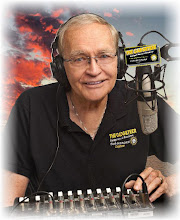
Chet Davis developed a passion for teaching while attending college. He became the General Manager of his campus radio station and soon found himself teaching others the tricks of the broadcasting trade. This led to a short professional stint in broadcasting, soon to be followed by entering the field of Media Technology at a local school. Here he developed a two-year technology curriculum that was approved by the California State Department of Education. He spent the next seventeen years teaching before being approached by MarcoSystem US where he became an instructor teaching computerized editing technology to media specialists nationwide and later becoming its Vice President. He’s presented at conferences and taught workshops in 49 states, 3 provinces, and in Europe. Chet testified before a congressional sub-committee about technology. His latest passion is helping folks become more secure in using today’s tech tools, so Chet now specializes in offering various on-line classes via the Internet for people like us.

What’s nice about this type of training is that classes are geared to specific topics. You can attend a live session, or an archived one, or even order a DVD and it’s all accessible worldwide. This conveniently fits our fast paced lifestyles allowing for quick content reviews that permit you to participate at your own pace. Didn’t understand something the first time, just go back and view the lesson again. Support for those in the program will be primarily thru a Facebook Page and direct comments in the online program. Email will also be an option for those in the Tech Support Club. Again, a great resource of information is just a click away!

Chet has recently incorporated his many classes geared for the “novice to the expert”, into what he calls his, “Tech Success Club”. This club offers a series of monthly resources with a featured topic that will have 3-5 short video lessons and a collection of other short video tips. Subjects include More Successful Computer Use, iPhone Apps ~ Tip & Tricks, Tablet/iPad Success, Social Media/Internet/Website Success, and Technology For Your Home, just to mention a few. His first class, “FACEBOOK CONFIDENCE”, is geared for anyone on Facebook with emphasis on enhancing the social media experience while improving his or her safety and security on the site. This class is available by itself, or as a part of the selection of learning resources for those who are members of the “TECH SUCCESS CLUB”. As a member you’ll receive engaging lessons each month and have the opportunity to connect with your tutor Chet and other members with your questions and tech hurdles. See the website for costs and registration.

I’ve known Chet for many years and have always valued his expertise and knowledge. He is a fantastic teacher and a resource for all things in the technology world. I also highly recommend his new book 


soon to be published,  PRACTICING SAFE TECH”, available in print, eBook (Kindle and iBooks) and audiobook.

For more information:

Tech Success Club
http://bit.ly/2HY3oqm

FaceBook Confidence
http://bit.ly/2FctWGz

Practicing Safe Tech
http://bit.ly/2CWyP0J ~ (A free 9-page PDF guide to safer passwords is available on this site)

Graphic credits: Chet Davis

Bob Skidmore is a freelance writer, who may be contacted at bob.thegadgeteer.skidmore@gmail.com, or followed at twitter.com/bskidmore for the latest gadget industry news. He does not represent, or endorse any of the products he reviews and his opinions are solely his points of view and not those of the manufacturer. The manufacturer generally supplies products and press releases at no cost for the articles and no other compensation is received. THE GADGETEER is highly selective as to products he feels worthy of review so as not to waste the reader’s time, thus the reason for many superior ratings.
##

Thursday, February 1, 2018

CES ~ 2018


Hit or a Miss? - CES 2018….

© 2018 BOB SKIDMORE ALL RIGHTS RESERVED

BOB SKIDMORE

CORRESPONDENT


Tis the season for the introduction of new gadgets. Some will make it, and some will not. CES-2018, the Consumer Electronics Show, in its 51st year, is the world’s technology proving ground. Some 3900 exhibitors showcased world-changing technologies that spanned more than 2.75 million net square feet of exhibit space in Las Vegas, making it the largest show floor in CES history. 


Attendance of over 184,000 attendees included major international brands and more than 900 startups, all vying to be the next smash hit in the electronic world of gadgets. With such a massive event it would be impossible for me to highlight everything, so I’ve selected a few of the most unusual. You be the judge as to whether it will be a hit, or a miss.

So here goes…. Kohler introduced the first voice-activated toilet, Numi, that links with Amazon’s Alexa. 


Yes, it can assist you with heating up the seat, automatically lifting and closing the lid, playing your favorite tunes, providing illumination, and most importantly complete the flushing cycle. Priced from $5625 - $7825, it’s a germophobic’s dream by never having to touch a toilet handle again! Available 4th quarter of this year. No, I’ve not tested this one.
Whill’s electric wheel chair introduced the Ci that uses a lithium-ion battery and can travel 5 MPH for 10 miles on one charge. Actually first introduced at last year’s show, this new version has many new features. It breaks down into 3 parts for easy packing. The wheels contain 24 separate rollers that permit the chair to move smoothly in any direction, and it has a joystick on the right armrest controls the operation. It can also be linked to an app allowing users to control it via their smartphone. Available now at $4000.00+.

Casio unveiled the GPR B-1000, a rather unusual version of their G-Shock series of watches. This is a GPS equipped watch that is part of the Rangeman line capable of GPS navigation for up to 33 hours on a single charge. The new Rangeman is the world’s first solar-assisted GPS navigation device and also has a Triple Sensor (alti/barometer, compass, thermometer) and Bluetooth connectivity. The watch has a low-temperature LCD display (-20°C, -4°F), sapphire crystal, and carbon fiber insert band for enhanced durability. It is water-resistant to 200 meters and like the original it is resistant to mud and dust. It can also display the current location on a route or bearing to a destination in real-time. Tracking data can be saved automatically in intervals and point data (time/date, longitude/latitude, altitude, atmospheric pressure, and temperature) can be recorded with the push of a button. Up to 20 tracks and 60 points can be saved to the memory log. The Backtrack function allows the user navigate to the starting point, using track data to display the route and current bearing. New routes can be created and log data managed on a Bluetooth-connected smartphone with the G-Shock Connected app, with a 2D and 3D map display and timeline for tracking data. You can even engage the built-in solar panel to keep the GPS running for one-hour after exposing it to only four-hours of direct sunlight. Placing it on the supplied wireless charging plate will get it back to full-power in just 5 hours. Available April 2018, priced at $800.00.

Other announcements included that Amazon’s Alexa is coming to Windows 10. HP, Lenovo, Asus and ACER announced that they will release Alexa-compatible laptops. So, every ECHO will soon present a new way to interact with your PC. It could mean that later this year you can issue voice commands to your computer allowing you to send things like spreadsheets to various people in your contact list by just asking. Alexa integrated devices dominated the show, while many tech companies focused on health related products.… Then there was the Coravin Wine Preservation Opener, a device that can dispense wine from a bottle without removing the cork. The most expensive model costs a mere $999.00, but does offer a Bluetooth function that will tell you how much wine you have consumed and how much is remaining in the bottle. LG displayed a roll up OLED TV prototype, while Samsung’s Q9S 85” 8K TV was a beautiful display. 

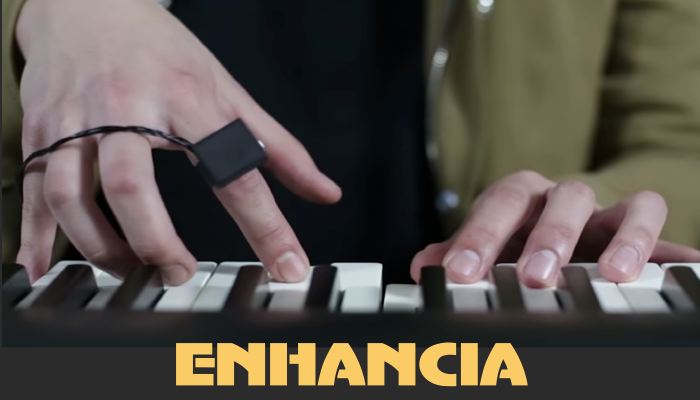
A unique item from France is called Enhancia.  It's software and hardware based with a ring you wear on your finger that’s connected to a hub or laptop that links with an electronic instrument such as an electronic keyboard. The musician can move their hand with the ring on it to create a vibrato effect, or raise the volume up and down by simply moving your hand in an upward or downward motion. All this is accomplished to the musical notes you’re playing. You can combine any or all these limitless customized effects in the final process. Enhancia is geared towards musicians who create their own music. The company announced they will launch a Kickstarter campaign this spring. Projected final cost $250-$400.

As I stated from the outset of this article, CES is a test center or proving ground that ultimately separates the marketable from the unmarketable, while showing what technological possibilities are possible. CES Certainly makes for an entertaining experience at the entrepreneur’s expense or disappointment.

Images: By the manufacturer, Google Images, CES and Youtube

Bob Skidmore is a freelance writer, who may be contacted at bob.thegadgeteer.skidmore@gmail.com, or followed at twitter.com/bskidmore for the latest gadget industry news. He does not represent, or endorse any of the products he reviews and his opinions are solely his points of view and not those of the manufacturer. The manufacturer generally supplies products at no cost for the articles and no other compensation is received. THE GADGETEER is highly selective as to products he feels worthy of review so as not to waste the reader’s time, thus the reason for many superior ratings. In some cases news services and press releases made available to the GADGETEER are used to compile this column.


##

Monday, January 1, 2018

Disabling Your Smartphone


DISABLING YOUR SMARTPHONE  ~
What to do before disposing of your Smartphone….

© 2018 BOB SKIDMORE ALL RIGHTS RESERVED

BOB SKIDMORE

CORRESPONDENT


I’m often asked how do I ensure that my private data is no longer accessible on my iPhone before I sell or dispose of it. Well here are some tips that should assist you.

Simply go to the SETTINGS APP, then tap on YOUR NAME at the top of the SETTINGS screen just below the word Settings.


Tap on the iCloud selection followed by scrolling down to the iCloud Backup selection


and tap BACK UP NOW.


Most new iPhones will backup the entire contents making it very easy to restore all this data on your new phone. Older models require you to use iTunes on your computer to backup the entire contents. You’ll then use iTunes again to download this data to your new phone. In this mode you may have to re-download your previous apps from the Apple App store. In some cases, if the APP is no longer offered the APP will not download. However, all former APPS that remain current will be restored at no additional charge.

(TIP: You should always backup your data daily. This should be a part of you initial setup when acquiring a new phone. Following the steps above and then turning on the iCloud Backup button accomplishes this. If you have more than 5gb of data you will need to follow the instructions to purchase more iCloud space from Apple. Apple provides 5gb for free, however, that’s really not enough. Additional amounts are available at any time for a small monthly charge and may be purchased on this same screen. So, it’s wise to purchase the next storage capacity, or even more if you immediately need it, knowing you can always increase it at a later date.)


To begin the process of deleting your data you’ll want to follow these steps:
~NOTE: IOS 11.1.2 was used for this article~

1.  Delete the FIND MY iPHONE APP . You’ll find this above the iCloud Backup selection on the iCloud Screen.  Tap OFF. (You’ll be asked for your Apple ID)


     2. Tap SIGN OUT


The phone will ask you if you are sure that you want to erase all your data. Selecting and tapping on DELETE FROM MY iPHONE


indicates that you agree with this and will start the process of eliminating everything on your iPhone. You will not be able to reverse this process, so be sure you’re ready for this step. You would be well advised to download your data from the iCloud to your new phone prior to deleting it on the old one. Your cell phone service provider, or the Apple store should be able to show you this simple process to get you started. Once your phone’s data is deleted, double check that everything’s gone.

Android users, make sure your device is encrypted; If your phone is relatively new, there’s a good chance it already is; Perform a factory reset to fully erase; Remove your SIM card and any other storage cards; Remove any remaining account associations such as your Google account and other accounts that may be associated with it.

Graphic credits: THE GADGETEER


Bob Skidmore is a freelance writer, who may be contacted at bob.thegadgeteer.skidmore@gmail.com, or followed at twitter.com/bskidmore for the latest gadget industry news. He does not represent, or endorse any of the products he reviews and his opinions are solely his points of view and not those of the manufacturer. The manufacturer generally supplies products and press releases at no cost for the articles and no other compensation is received. THE GADGETEER is highly selective as to products he feels worthy of review so as not to waste the reader’s time, thus the reason for many superior ratings.