Thursday, February 1, 2018

CES ~ 2018


Hit or a Miss? - CES 2018….

© 2018 BOB SKIDMORE ALL RIGHTS RESERVED

BOB SKIDMORE

CORRESPONDENT


Tis the season for the introduction of new gadgets. Some will make it, and some will not. CES-2018, the Consumer Electronics Show, in its 51st year, is the world’s technology proving ground. Some 3900 exhibitors showcased world-changing technologies that spanned more than 2.75 million net square feet of exhibit space in Las Vegas, making it the largest show floor in CES history. 


Attendance of over 184,000 attendees included major international brands and more than 900 startups, all vying to be the next smash hit in the electronic world of gadgets. With such a massive event it would be impossible for me to highlight everything, so I’ve selected a few of the most unusual. You be the judge as to whether it will be a hit, or a miss.

So here goes…. Kohler introduced the first voice-activated toilet, Numi, that links with Amazon’s Alexa. 


Yes, it can assist you with heating up the seat, automatically lifting and closing the lid, playing your favorite tunes, providing illumination, and most importantly complete the flushing cycle. Priced from $5625 - $7825, it’s a germophobic’s dream by never having to touch a toilet handle again! Available 4th quarter of this year. No, I’ve not tested this one.
Whill’s electric wheel chair introduced the Ci that uses a lithium-ion battery and can travel 5 MPH for 10 miles on one charge. Actually first introduced at last year’s show, this new version has many new features. It breaks down into 3 parts for easy packing. The wheels contain 24 separate rollers that permit the chair to move smoothly in any direction, and it has a joystick on the right armrest controls the operation. It can also be linked to an app allowing users to control it via their smartphone. Available now at $4000.00+.

Casio unveiled the GPR B-1000, a rather unusual version of their G-Shock series of watches. This is a GPS equipped watch that is part of the Rangeman line capable of GPS navigation for up to 33 hours on a single charge. The new Rangeman is the world’s first solar-assisted GPS navigation device and also has a Triple Sensor (alti/barometer, compass, thermometer) and Bluetooth connectivity. The watch has a low-temperature LCD display (-20°C, -4°F), sapphire crystal, and carbon fiber insert band for enhanced durability. It is water-resistant to 200 meters and like the original it is resistant to mud and dust. It can also display the current location on a route or bearing to a destination in real-time. Tracking data can be saved automatically in intervals and point data (time/date, longitude/latitude, altitude, atmospheric pressure, and temperature) can be recorded with the push of a button. Up to 20 tracks and 60 points can be saved to the memory log. The Backtrack function allows the user navigate to the starting point, using track data to display the route and current bearing. New routes can be created and log data managed on a Bluetooth-connected smartphone with the G-Shock Connected app, with a 2D and 3D map display and timeline for tracking data. You can even engage the built-in solar panel to keep the GPS running for one-hour after exposing it to only four-hours of direct sunlight. Placing it on the supplied wireless charging plate will get it back to full-power in just 5 hours. Available April 2018, priced at $800.00.

Other announcements included that Amazon’s Alexa is coming to Windows 10. HP, Lenovo, Asus and ACER announced that they will release Alexa-compatible laptops. So, every ECHO will soon present a new way to interact with your PC. It could mean that later this year you can issue voice commands to your computer allowing you to send things like spreadsheets to various people in your contact list by just asking. Alexa integrated devices dominated the show, while many tech companies focused on health related products.… Then there was the Coravin Wine Preservation Opener, a device that can dispense wine from a bottle without removing the cork. The most expensive model costs a mere $999.00, but does offer a Bluetooth function that will tell you how much wine you have consumed and how much is remaining in the bottle. LG displayed a roll up OLED TV prototype, while Samsung’s Q9S 85” 8K TV was a beautiful display. 
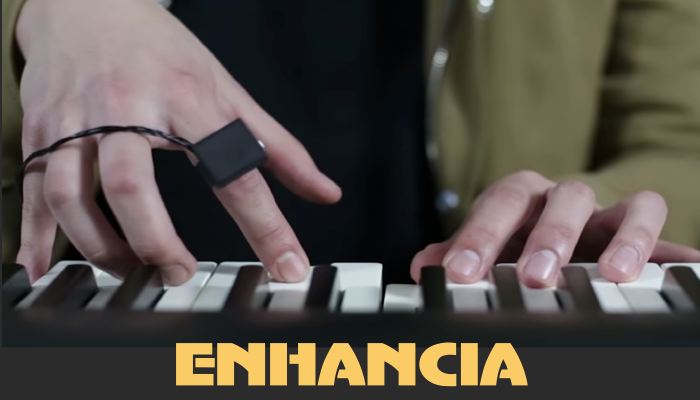
A unique item from France is called Enhancia.  It's software and hardware based with a ring you wear on your finger that’s connected to a hub or laptop that links with an electronic instrument such as an electronic keyboard. The musician can move their hand with the ring on it to create a vibrato effect, or raise the volume up and down by simply moving your hand in an upward or downward motion. All this is accomplished to the musical notes you’re playing. You can combine any or all these limitless customized effects in the final process. Enhancia is geared towards musicians who create their own music. The company announced they will launch a Kickstarter campaign this spring. Projected final cost $250-$400.

As I stated from the outset of this article, CES is a test center or proving ground that ultimately separates the marketable from the unmarketable, while showing what technological possibilities are possible. CES Certainly makes for an entertaining experience at the entrepreneur’s expense or disappointment.

Images: By the manufacturer, Google Images, CES and Youtube

Bob Skidmore is a freelance writer, who may be contacted at bob.thegadgeteer.skidmore@gmail.com, or followed at twitter.com/bskidmore for the latest gadget industry news. He does not represent, or endorse any of the products he reviews and his opinions are solely his points of view and not those of the manufacturer. The manufacturer generally supplies products at no cost for the articles and no other compensation is received. THE GADGETEER is highly selective as to products he feels worthy of review so as not to waste the reader’s time, thus the reason for many superior ratings. In some cases news services and press releases made available to the GADGETEER are used to compile this column.


##

Monday, January 1, 2018

Disabling Your Smartphone


DISABLING YOUR SMARTPHONE  ~
What to do before disposing of your Smartphone….

© 2018 BOB SKIDMORE ALL RIGHTS RESERVED

BOB SKIDMORE

CORRESPONDENT


I’m often asked how do I ensure that my private data is no longer accessible on my iPhone before I sell or dispose of it. Well here are some tips that should assist you.

Simply go to the SETTINGS APP, then tap on YOUR NAME at the top of the SETTINGS screen just below the word Settings.


Tap on the iCloud selection followed by scrolling down to the iCloud Backup selection


and tap BACK UP NOW.


Most new iPhones will backup the entire contents making it very easy to restore all this data on your new phone. Older models require you to use iTunes on your computer to backup the entire contents. You’ll then use iTunes again to download this data to your new phone. In this mode you may have to re-download your previous apps from the Apple App store. In some cases, if the APP is no longer offered the APP will not download. However, all former APPS that remain current will be restored at no additional charge.

(TIP: You should always backup your data daily. This should be a part of you initial setup when acquiring a new phone. Following the steps above and then turning on the iCloud Backup button accomplishes this. If you have more than 5gb of data you will need to follow the instructions to purchase more iCloud space from Apple. Apple provides 5gb for free, however, that’s really not enough. Additional amounts are available at any time for a small monthly charge and may be purchased on this same screen. So, it’s wise to purchase the next storage capacity, or even more if you immediately need it, knowing you can always increase it at a later date.)


To begin the process of deleting your data you’ll want to follow these steps:
~NOTE: IOS 11.1.2 was used for this article~

1.  Delete the FIND MY iPHONE APP . You’ll find this above the iCloud Backup selection on the iCloud Screen.  Tap OFF. (You’ll be asked for your Apple ID)


     2. Tap SIGN OUT


The phone will ask you if you are sure that you want to erase all your data. Selecting and tapping on DELETE FROM MY iPHONE


indicates that you agree with this and will start the process of eliminating everything on your iPhone. You will not be able to reverse this process, so be sure you’re ready for this step. You would be well advised to download your data from the iCloud to your new phone prior to deleting it on the old one. Your cell phone service provider, or the Apple store should be able to show you this simple process to get you started. Once your phone’s data is deleted, double check that everything’s gone.

Android users, make sure your device is encrypted; If your phone is relatively new, there’s a good chance it already is; Perform a factory reset to fully erase; Remove your SIM card and any other storage cards; Remove any remaining account associations such as your Google account and other accounts that may be associated with it.

Graphic credits: THE GADGETEER


Bob Skidmore is a freelance writer, who may be contacted at bob.thegadgeteer.skidmore@gmail.com, or followed at twitter.com/bskidmore for the latest gadget industry news. He does not represent, or endorse any of the products he reviews and his opinions are solely his points of view and not those of the manufacturer. The manufacturer generally supplies products and press releases at no cost for the articles and no other compensation is received. THE GADGETEER is highly selective as to products he feels worthy of review so as not to waste the reader’s time, thus the reason for many superior ratings.

Friday, December 1, 2017

HIDDEN NUMBERS REVEALED


Contacting Tech Support Made Easy….

© 2017 BOB SKIDMORE ALL RIGHTS RESERVED

BOB SKIDMORE

CORRESPONDENT


Have you ever wanted to talk to a real person for TECH SUPPORT, but didn’t know who or how to call? It’s a common problem caused by many companies not listing their contact phone numbers. So, here’s a list of some of the most common that I’ve managed to acquire. Hope it helps!


(TIP: I’ve provided a link where you can easily download this reference sheet as a jpeg chart. Go to: http://www.goo.gl/pLb2gr Drag and Drop. NOTE: These numbers were accurate when this article was written, but as always, subject to change.)

SERVICE PROVIDERS

AOL                    800.827.6363
AT&T DSL          800.331.0500
AT&T Universal    800.288.2020
Cablevision           800.868.9840
Charter                 888.438.2427
Clearwire              888.253.2795
Comcast               800.266.2278
Cox                     800.234.3993
Earthlink              888.327.8454
HughesNet            866.347.3292
Qwest                           888.777.9569
RoadRunner          877.318.8333
Spectrum              855.222.0102
Telus                    877.310.4638
Time Warner         800.892.4357
Verizon DSL         800.567.6789
Verizon FIOS        888.553.1555
WOW          855.496.9929

SOFTWARE VENDERS

Adobe                  800.833.6687
Alsoft DiskWarrior   800.257.6381
Amazon ECHO     877.375.9365
Dell                      800.624.9896
FileMaker             800.325.2747
Google                 650.623.4000
IBM                     800.426.4968
Logitech               800.231.7717
Microtech             800.223.3693
Microsoft (MAC)   866.474.4882
NetFlix                 888.638.3549
NetScape              866.541.8233
Parallels                888.811.2489
Quark                           800.676.4575
VMware Fusion     877.486.9273

PRINTERS

Brother                800.282.4329
Canon                  800.828.4040
Epson                           800.533.3731
HP                       800.474.6836
Lexmark              800.539.6275

ROUTERS & MODEMS

AT&T Uverse       800.288.2020
2wire                   480.567.7021
Belkin                  800.223.5546
Cisco                    800.553.2447
D-Link                 888.814.2882
Linksys                800.326.7114
NetGear               888.638.4327
Motorola              877.466.8646

VIRUS PROGRAMS

AVG                    828.459.5422
ESET                   619.630.2300
Kaspersky             781.503.1820
MacKeeper           888.572.5876
McAfee                888.847.8766
Norton                 800.441.7234
Symantec             800.745.6071

EXTERNAL DRIVES

G-TECHNOLOGY   888.426.5214
iOmega                888.516.8467
LaCie                   503.844.4503
Promise                408.228.1400
Seagate                800.732.4283
Western Digital      800.275.4932

DISPLAYS & TELEVISIONS

Acer                    800.816.2237
Hitachi                 800.448.2244
JVC                     800.252.5722
Mitsubishi             800.222.0037
Philips                  888.744.5477
RCA                    877.506.3411
Samsung              800.726.7864
Sanyo                           800.577.5032
Sharp                   800.237.4277
Sony Display         866.357.7669
Sony TV               800.222.7669
Sylvania               866.321.3927
Toshiba                800.631.3811
Vizio                    877.698.4946

MISCELLANIOUS

Adeptec                800.416.8066
Amazon               888.280.4331
Apple                   800.275.2273
Apple (iPhone)      800.694.7466
Apple (Education)  800.800.2775
Apple Accessibility & Assistive-
Technology           877.204.3930
Asante                  877.262.0324
Avid                    800.800.2843
BIAS                   800.775.2427
BlackBerry           877.255.2377
DHL                    800.225.5345
EBAY                  866.540.3229
FedEx                  800.406.3339
GoDaddy              480.505.8877
Kensington           800.535.4242
MacroSystem U S 877.554.2846
Microsoft              800.936.5700
Motorola              800.331.6456
Palm                    877.426.3777
Quicken                800.811.8766
Yahoo                  866.492.4684
YouTube              650.253.0000
UPS                     800.742.5877
USPS                   800.275.8777
Vonage                 866.243.4357
Weebly                 844.493.3259

CREDIT SERVICES

Equifax                800.349.9960
Experian               888.397.3742
TransUnion           888.909.8872

TV NETWORKS

ABC                    212.456.2700
CBS                     212.975.4321
CNN                    404.827.1500
FOX                    888.369.4762
NBC                    212.664.4444

Graphic credits: THE GADGETEER

Bob Skidmore is a freelance writer, who may be contacted at bob.thegadgeteer.skidmore@gmail.com, or followed at twitter.com/bskidmore for the latest gadget industry news. He does not represent, or endorse any of the products he reviews and his opinions are solely his points of view and not those of the manufacturer. The manufacturer generally supplies products and press releases at no cost for the articles and no other compensation is received. THE GADGETEER is highly selective as to products he feels worthy of review so as not to waste the reader’s time, thus the reason for many superior ratings.
##