
Tuesday, January 1, 2013

FIND YOUR STUFF, Bluetooth To The Rescue


Bluetooth to the rescue!

© 2013 BOB SKIDMORE ALL RIGHTS RESERVED

BOB SKIDMORE

CORRESPONDENT


If you own an iPhone or iPad you no doubt have installed the Find My iPhone App. For the uninitiated, this app allows you to track the location of your iPhone or iPad from any location using any computer or another iPhone or iPad as long as you have an iCloud account. All you need to know is the Apple ID and password of the missing device, have both units connected via wi-fi, and have the missing device turned on. That’s great for finding Apple products, but what about your keys, purse, attaché’ case, backpack or Android phone? Here’s a neat solution that really works….

Cobra Electronics Corporation has introduced the BT 225 and 225uni, Bluetooth Tag alarms. These devices use an App on your iPhone, iPad or Android smartphone to assist you in locating lost items.

Here’s how it works. You download the free Cobra Tag App to your smartphone/iPad. Since the tag is a Bluetooth device, you mate it to your Bluetooth network on your phone or iPad. Once the connection is made your tag has been activated. Turn on the tag by holding in its activation button for several seconds until you see three blinks of the blue indicator light and hear a beep. Now the tag is engaged and capable of tracking whatever you attach it to. If the tag is separated by more than 30 feet, the typical range of Bluetooth technology, your smartphone or iPad will sound a siren alarm alerting you that you’ve forgotten something. In addition, it has the ability, while in Bluetooth range, of sending you an email alerting you that a specific device was left behind and gives you a link to Google maps with an indicator showing the exact location.

If you simply misplaced the tagged item you can open the Cobra Tag App and activate the siren alarm on the tag that’s attached to the missing item. If you’ve misplaced your smartphone or iPad you can press the button on the tag and the siren alarm will sound on either of those devices, perhaps a bit faster than using the Find My iPhone App and more effective since the iPhone App shows you a general GPS location, while the Tag’s ear-piercing alarm pinpoints you to the exact location.


(TIP: Bluetooth has an approximate range of 30 feet, so missing items need to be searched for within that range. When you separate your smartphone or iPad more than the working range of Bluetooth technology the loss of the Bluetooth signal causes the alarm signal to be activated on your smartphone or iPad indicating you’ve left something behind. )

Cobra has designed the Tag App to accommodate up to seven Tags. You assign each Tag a specific name and icon such as keys, purse, laptop, etc., and they are displayed and selectable on the App. The Tag itself will remain charged for about seven days so they say, however, my tests indicate about two to three days. It’s best to charge more frequently and avoid the Tag from loosing the Bluetooth connection. If the connection is lost you’ll need to go into the settings of your smartphone and follow the steps to reconnect. Now, the trick is to remember to charge it since if you forget to, the Tag will not operate. A mini/Std USB cable is included that plugs into a standard cube USB charging device, not provided.

The Cobra Tag is an excellent solution to finding misplaced items. It works well and has been a lifesaver for my wife many times. One use could equal the price of the Tag not to mention avoiding the aggravation and stress associated with loosing things.

MSRP: BT 225uni (iphone/iPad compatible) BT 225 (Android compatible) $79.99

Available at retail and on line.

For more information go to: http://www.cobra.com (Use cobra tag for item search)

GADGETEER’S RATING: *****

Bob Skidmore is a freelance writer, who may be contacted at bob.thegadgeteer.skidmore@gmail.com, or followed at twitter.com/bskidmore for the latest gadget industry news. He does not represent, or endorse any of the products he reviews and his opinions are solely his points of view and not those of the manufacturer. The manufacturer generally supplies products at no cost for the articles and no other compensation is received. THE GADGETEER is highly selective as to products he feels worthy of review so as not to waste the reader’s time, thus the reason for many superior ratings.
##

Saturday, December 1, 2012

SANDVOX 2, Web Site Creation Software, Revisited!


© 2012 BOB SKIDMORE ALL RIGHTS RESERVED

BOB SKIDMORE

CORRESPONDENT


Web site creation should be fun and easy. Last year I did a review of Sandvox’s Version 1, which did just that. Recently, Version 2.7 was released with a host of improvements and features. In this article I shall concentrate on some of the improvements. If you want more overall detailed information on the software benefits you can see my previous review that explores the original program in depth. http://bit.ly/dFTmw0

(TIP: Sandvox 2 uses HTML 5 to ensure compatibility with ios devices, such as iPhone, iPod Touch, MAC and Windows computer platforms. )

Sandvox’s system requirements have three options. Sandvox 2.2 runs on MAC’s OS 10.5, if you have OS 10.4 you’ll need to use the original Sandvox 1.6. If you have an Intel MAC you will want Sandvox 2.7, the most up-to date version and what we tested for this review. It supports English, French, German, Italian, Spanish (Brazilian & Portuguese), simplified Chinese and Japanese.

(TIP: You can use this software to create as many web sites as you wish. If, however, you are building a web site for someone else, and they wish to maintain it, they will need to purchase their own copy of Sandvox. )

The general construction template is very similar to Version 1. It’s based around the simple concept of drag, drop and publish. There are multiple new designs as well as the ones from the previous version, with many more available on line from third party designers. Once you have started working with a selected design it is possible to change the design without loosing the content, however, some rearranging of verbiage may be necessary. As is always the case, not all subject categories are represented, something that can be rectified with a custom design feature. This feature would be more for designers and developers and not the average user. http://bit.ly/263Zft

A new Inspector, a common MAC design tool, provides for better control making it easier to adjust layouts, add features and characteristics. You can now apply these changes to a single object or the entire web site. A new Photo Gallery offers a gallery style view with only one click in the Inspector window. You can easily add links to Facebook, Twitter, blogs and a comment section.

(TIP: Sandvox automatically organizes your site and page content in such a way that aids search engines to find the most important content. This is an invaluable tool in guiding people to your site. To make the most of this feature register your site with GOOGLE WEBMASTER TOOLS, http://bit.ly/oGe6PP )

Sandvox 2 has added what they call Flexible Objects. This feature allows you to quickly add blocks of text, images, movies, and Quick link to Amazon that includes using your affiliate tag. You can feature YouTube videos, RSS feed selection and incorporate news and/or weather content from other web sites. You can insert raw HTML to add custom features. All these extras make your site look current and alive. Sandvox claims over 60 major new features and improvements, too many to highlight here, but that’s what makes the Sandvox software so attractive.

As always, Sandvox offers a number of short tip links including a seven-chapter screencast. They are helpful, however, what’s missing, that was available with version 1, is an optional step-by-step CD. This CD walks you thru the process in creating a web site. The nice thing about this was that you could play the CD along side the template as you were developing your own site. When the disc was finished, your site was completed and ready to upload. Since Sandvox’s concept is to make the web site creation simple, so even the novice can use it, this is a much-needed tool to ensure that you utilize all the features and get the most from this powerful program. Presently, you may have to dig a bit to find all but the most-used features that are available.

Sandvox 2.7, 2.2 or even 1.6 software offers the easiest way to create professional looking web sites at a very low cost. Version 2 is so feature packed that you would be hard pressed to find anything else to compare it to. You can actually create and publish a five-page web site in under an hour with no prior experience. Whether you are an HTML pro or just a novice, Sandvox makes creating a web site fast, easy and fun, too. This may be your incentive to step up to a MAC! Remember, a MAC can run Windows, too.

MSRP: $79.99

Available on line

For ordering and more information go to: http://bit.ly/P1f0M

GADGETEER’S RATING: *****

Bob Skidmore is a freelance writer, who may be contacted at bob.thegadgeteer.skidmore@gmail.com, or followed at twitter.com/bskidmore for the latest gadget industry news. He does not represent, or endorse any of the products he reviews and his opinions are solely his points of view and not those of the manufacturer. The manufacturer generally supplies products at no cost for the articles and no other compensation is received. THE GADGETEER is highly selective as to products he feels worthy of review so as not to waste the reader’s time, thus the reason for many superior ratings.

##

Thursday, November 1, 2012

WeMo, Controlling Your Home From Afar


WeMo, Controlling Your Home From Afar…

© 2012 BOB SKIDMORE ALL RIGHTS RESERVED

BOB SKIDMORE

CORRESPONDENT


Over 700,000 apps are now available for the iPhone/iPad/iPod, but do any allow you to control your home’s electrical devices? Belkin, a leading manufacturer of computer, tablet and smartphone peripherals, recently introduced WeMo, a series of plug-in modules that do just that when used with your Wi-Fi network.

So, how does it work? Presently there are two modules available that plug into your standard electrical wall outlet. The first module is a SWITCH that connects with any *120 volt, 15 amp (1800 watt) device such as heaters, portable air conditioners, lights, coffee makers, etc and includes a manual override button with a Wi-Fi signal strength indicator that’s also found on the MOTION.

(TIP: A unique application could be to reboot a device such as a DVR that’s frozen and can’t be viewed from afar via a Sling Box without momentarily cutting off the power to it.)

Once the SWITCH and the device are connected you may control the operation of the device via your iPhone (3GS+), iPod Touch (3rdGen+) and all models of the iPad, with a FREE WeMo app available from Apple’s App store. Android smartphones may be compatible in the near future. Sounds easy, and it is. The second module is known as MOTION and is used to control the SWITCH when the MOTION module detects any movement in its path and leaves the device on when set in the default mode. When used with a FREE web service from ifttt.com it can send you a text or email alerting you that MOTION has detected some sort of movement in its path, now making it a low cost security device.


(TIP: *WeMo is currently available in the U. S. & U. K. and will soon be released in France and Germany, followed by a world-wide roll-out in 2013. Naturally, those models will be designed with the proper plugs and voltage/wattage specifications and will vary according to country. Operation from your iPhone/iPad/iPod is via the Internet and not country dependent.)

The WeMo app offers a wide range of fine tuning settings known as RULES. These RULES allow you to go beyond simple manual on/off operation. You can now program specific times, duration of operation, and days of operation as well as sensitivity of motion detection to activate the SWITCH. Once again, you can be alerted when these activities take place if you subscribe to ifttt.com.

(TIP: ifttt.com (If This Then That) offers many features for expanding this device including the possibility of having a lamp momentarily turn on when you receive an email or a Facebook mention. Ifttt is certainly not limited to WeMo and may benefit you in many other ways. Worth checking out!)

Installation and operation are relatively easy. Belkin has provided a special WeMo customer support team specifically for this product that’s accessible by phone, on-line chat, email or user blog in the event you need assistance. Belkin’s customer service after the sale, is excellent!

I’ve tested this product extensively and find it to be well worth the investment. The SWITCH is available separately since the app can support up to 32 of them, or as a kit with the MOTION module included.

MSRP: $99.95 (kit) $49.95 (SWITCH or MOTION module only)

Available on line and at various retailers. For more information:


GADGETEER’S RATING: *****

Bob Skidmore is a freelance writer, who may be contacted at bob.thegadgeteer.skidmore@gmail.com, or followed at twitter.com/bskidmore for the latest gadget industry news. He does not represent, or endorse any of the products he reviews and his opinions are solely his points of view and not those of the manufacturer. The manufacturer generally supplies products at no cost for the articles and no other compensation is received. THE GADGETEER is highly selective as to products he feels worthy of review so as not to waste the reader’s time, thus the reason for many superior ratings.

##

Monday, October 1, 2012

SteadePod


SteadePod, Pocketsized stabilization for iPhone and other digital cameras…

© 2012 BOB SKIDMORE ALL RIGHTS RESERVED

BOB SKIDMORE

CORRESPONDENT


One of the pitfalls of small cameras, whether they be an iPhone, Flip or other pocket digital camera, is that they become somewhat difficult to hold, much less pan or tilt, and still maintain a steady image. Naturally, a tripod eliminates such issues, but then that negates the benefit of quick, on-the-spot documentation that pocket photographic devices offer. SteadePod offers an interesting alternative to the traditional tripod.

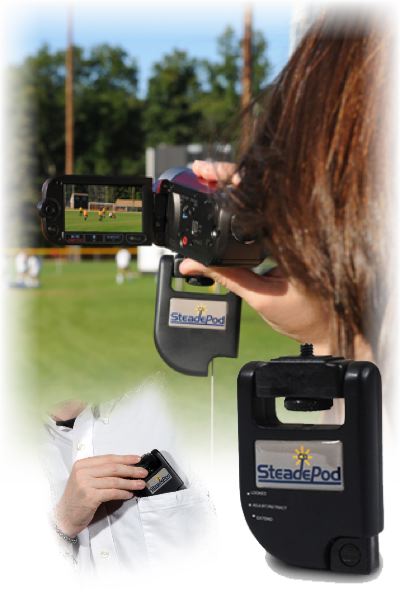
The SteadePod is a pocket-sized device that attaches to your camera with a normal 1/4” x 20 thumbscrew mount. Since most smartphones have no tripod thread the iStabilizer, discussed in a previous article, would be required. Once attached, a built-in, adjustable cord with footpad, anchors to your shoe’s sole, lace or even a belt loop. Since the cord is adjustable you are easily able to attain the ideal height for your shot. When attained, you simply lock in the adjustment with the side-mounted lever.

(TIP: The side-mounted lever adjustment has three positions; LOCKED, does not permit any adjustment; ADJUST/RETRACT, allows the cord to be continuously adjustable in either direction and until locked remains flexible; EXTEND, allows extending the length/height without the immediate possibility of retraction. In most applications the ADJUST/RETRACT and the LOCKED positions would be the most used combination)

The SteadePod works very well for “straight-on” shots and especially well when panning or tilting. Headshots are rock solid and pans are smooth and therefore can be slow, a technique that gives videos that professional look. Time exposures and extreme telephoto shots are now easily possible, too. Considering size, portability, cost and ease of use the SteadePod is a good addition to your smartphone or digital camera, no matter what the size. It certainly beats a homemade device a friend of mine made for me several years ago. It consisted of a screw on one end, attached to a short string with a large washer at the other end that provided weight and served as an improvised footpad. Fortunately, these features are now designed into this compact accessory.

(TIP: Panning should generally be slow. Fast pans result in out-of-focus or blury scenes that quickly cause the viewer to tune-out. Since the SteadePod provides for smooth camera movements your videos will tell a story and be more enjoyable to watch.)

MSRP: $29.95

Available on line and at various retailers. For more information:


iStabilizer: http://bit.ly/Quqcjc

GADGETEER’S RATING: *****

Bob Skidmore is a freelance writer, who may be contacted at bob.thegadgeteer.skidmore@gmail.com, or followed at twitter.com/bskidmore for the latest gadget industry news. He does not represent, or endorse any of the products he reviews and his opinions are solely his points of view and not those of the manufacturer. The manufacturer generally supplies products at no cost for the articles and no other compensation is received. THE GADGETEER is highly selective as to products he feels worthy of review so as not to waste the reader’s time, thus the reason for many superior ratings.


##

Saturday, September 1, 2012

BROTHER 2270DW, Laser Printer


© 2012 BOB SKIDMORE ALL RIGHTS RESERVED

BOB SKIDMORE

CORRESPONDENT


Generally speaking, there are four types of printer formats, dot matrix, inkjet, laser, and color laser. Each serves a specific purpose, so part of the selection process depends on your use. If you only want one printer you’ll probably be best served with an inkjet model. These are great for document as well as photo printing with a host of affordable models and features available depending primarily on your photo reproduction expectations, a subject for another article. The other practical choice is a laser. Color lasers require multiple, expensive toner cartridges and photo reproduction can be somewhat disappointing unless you spend BIG bucks. B & W lasers have become very affordable and available in all price ranges plus use a relatively inexpensive single toner cartridge. All lasers use a drum that typically requires replacement after three toner cartridges have been replaced.

(TIP: Laser printers use toner cartridges, a drum, and a xerographic printing process. They differ from analog photocopiers in that the image is produced by the direct scanning of a laser beam across the printer's photo sensor. An inkjet printer is a type of  printer that creates a digital image by propelling droplets of ink onto the surface of the material to be printed. Dot matrix printers use a ribbon much like the obsolete typewriters of days gone by, are rarely used now and would be hard to purchase. )

I tested the compact, tri-platform, Brother 2270DW B & W laser printer. This printer has numerous features that benefit both the home and small business user at a very affordable price point. Its size, 18.5”W-14.2”D-12.6”H, allows it to fit in tight spaces. However, the most impressive feature is its ability to print double-sided documents, a savings in document pages and paper stock. It prints 27 pages per minute with a resolution of 2400 x 600 dpi, has a 250-page capacity, and a 32mb memory buffer. It’s network ready too, providing built-in wireless 802.11b/g, not AirPrint, and Ethernet interfaces. By downloading the free CORTADO WORKPLACE App to your mobile device it may be possible to print directly from mobile devices such as Apple, Android or Blackberry. High volume toner cartridges are available with a yield of +/- 2600 pages compared to the standard cartridge’s 1200.

(TIP: Laser printers offer a very high quality, professional look to your documents. AirPrint is a wireless technology for printing from a tablet or Smartphone. Cortado Workplace software is a third-party app used to interface tablets and smartphones to this printer. As always, certain operating system requirements may apply.)

I found the Brother 2270DW to be an exceptional printer at an unbelievable price point. Brother’s support department that ranks at the top along with its cost saving features and its print quality make it a GADGETEER’S BEST BUY PICK.

(TIP: To print double sided documents the original must be in a group such as stacked PDFs or a multiple page WORD document. Once you’ve selected the print command you will need to select COPIES & PAGES followed by LAYOUT and then turn on TWO-SIDED. This is the way it is done on a MAC, but a PC should be very similar.)

MSRP: $149.95

Available on line and at various retailers.

For more information go to:  http://bit.ly/N95D9N

GADGETEER’S RATING: *****

Bob Skidmore is a freelance writer, who may be contacted at bob.thegadgeteer.skidmore@gmail.com, or followed at twitter.com/bskidmore for the latest gadget industry news. He does not represent, or endorse any of the products he reviews and his opinions are solely his points of view and not those of the manufacturer. The manufacturer generally supplies products at no cost for the articles and no other compensation is received. THE GADGETEER is highly selective as to products he feels worthy of review so as not to waste the reader’s time, thus the reason for many superior ratings.
##
Wednesday, August 1, 2012

NANGUANG LED VIDEO LIGHT


NANGUANG LED VIDEO LIGHT - Portable lighting for your iPad, iPhone and digital cameras of any size…

© 2012 BOB SKIDMORE ALL RIGHTS RESERVED

BOB SKIDMORE

CORRESPONDENT


Proper lighting is an important part of shooting stills and videos. It sharpens detail, improves color reproduction, eliminates shadows, and decreases graininess, or video noise associated with digital photography. Many digital cameras lack the ability to add effective portable additional lighting. So here’s a solution that works.

The Nanguang CN-160 is a portable LED light source incorporating 160 LEDs at a color temperature of 5400 Kelvin (K). Included in the kit are three attachable filters: Spotlight Effect, Diffuser, and 3200K for indoor use.

(TIP: 5400 degrees Kelvin is considered the average color temperature for outdoor lighting. Naturally, this varies with the time of day and sky conditions. A 3200 K temperature is considered typical lighting consistent with an incandesant light source. When possible, it is suggested that external lighting devices be as closely matched to the color temperature of the surrounding light source.  In today’s digital world it is possible to make some corrections after the fact with programs like Photoshop for stills, or hue adjustments in video editing software, but you can’t beat having it correct the first time.)

What is color temperature? Color temperature is a characteristic of visible light that has important applications in lighting, photography, videography, publishing, manufacturing, astrophysics, horticulture, and other fields. The color temperature of a light source is the temperature of an ideal black body radiator that radiates light of comparable hue to that of the light source. To the non-techie, all you really need to know is to match the external light source to the available light as close as possible. Some cameras even do this automatically within reason.

Since today’s digital products such as the iPhone, iPad, and mini digital cameras are small and lightweight, a light’s physical size becomes a major consideration. The CN-160 with all its illumination (3’ at 900 Lux  – 15’ at 40 Lux) weighs in at under one-pound. It has a hot shoe, can be powered by 5 AA batteries, which is my choice or camcorder batteries such as the Sony’s NP-FH70, NP-FM55H, NP-F550 or a Panasonic CGR-D16S. Such batteries have a shelf life of two or less years. What’s missing is a connection for an external AC adapter since battery runtime is 70 – 90 minutes.

(TIP: AA batteries are lightweight, inexpensive and readily available worldwide. Camcorder batteries such as those previously mentioned, are expensive, bulky, require charging, and offer no advantage unless you already own them.)

The CN-160 is a well-designed light source that includes a linear “remaining charge” indicator and rotary switch that serves as a handy dimmer as well as on/off switch. Mounting can be accomplished with a shoe, optional L bracket, or mounting bar. In the case of smartphones or iPads, the use of an optional iStablizer smartphone tripod mount or iShot G8 Pro adapter for iPads with camera mounting bar easily adapts the camera for mounting the CN-160 to the light. Any way you use it, the CN-160 is an effective, feature packed light source at a low price with an average service life of 50000+ hours. When mounted on the L bracket, it increases the stability and feel of the camera resulting in shake-free images.


CN-160: Price varies. For more info go to: http://bit.ly/MEMnm8
L bracket camera mounting bars are available at most camera supply stores. istablizer: http://bit.ly/Quqcjc

GADGETEER’S RATING: *****

Bob Skidmore is a freelance writer, who may be contacted at bob.thegadgeteer.skidmore@gmail.com, or followed at twitter.com/bskidmore for the latest gadget industry news. He does not represent, or endorse any of the products he reviews and his opinions are solely his points of view and not those of the manufacturer. The manufacturer generally supplies products at no cost for the articles and no other compensation is received. THE GADGETEER is highly selective as to products he feels worthy of review so as not to waste the reader’s time, thus the reason for many superior ratings.
##

Sunday, July 1, 2012

DRY CASE, Waterproof protection for iPad, iPhone and other devices


DRY CASE, Waterproof protection for iPad, iPhone and other devices…

© 2012 BOB SKIDMORE ALL RIGHTS RESERVED

BOB SKIDMORE

CORRESPONDENT


DRY CASE, a product of medical manufacturer, Dry Corp, LLC, offers a unique solution to protecting your valuable electronic devices from damage caused by rain, submersion and sand. Not only can you dive with these cases, but they are also great protection when boating, kayaking and beach going since they prevent water and sand from damaging your devices.

(TIP: If you’re not diving with the DRY CASE, but rather concerned about an accidental spill into the water, consider attaching a fishing bobber or other floatation device so you can easily retrieve the device since the DRY CASE will not float.)

(TIP: Condensation may occur depending on the depth and general water temperature when compared to above water temperatures.)

Available in two models; DRY CASE, for small devices such as iPhone, digital cameras, cell phones, etc., and DRY CASE TABLET, a larger version, for tablets such as iPad and Kindle. Both cases include a watertight headphone & mic jack, and yes, they offer DRY BUDS, a combo ear bud mic/headset that’s fully submersible to 10’, but not tested for this article.

Now, not being a diver, I did not test the manufacture’s claim that either model may be taken to depths of up to 100’ for one-hour or less, but I did do some normal tests at moderate depths in a bay.

(TIP: The manufacturer warranties these products with a one-year replacement policy. They do not cover any damage to the device used in the DRY CASE which is understandable since prior condition of the device and proper operation play a major role in its success, all of which they have no control over. )

I found both models to be watertight. Well, they should be since the two sliding locking mechanisms are extremely difficult to lock and even more so, to un-lock. My suggestion to the manufacturer would be to reconfigure these locks to accommodate a specially made wrench for this application and supply it with the case. This is the weakest link in the otherwise flawless design. To further ensure water tightness a small hand pump is supplied that literally vacuum seals the case thus making it impossible to leak.

(TIP: When shooting under water many factors have to be considered. The deeper you are the less light is available and the useable subject distance drops off considerably. The type of light, and refraction factors play a major role with color temperature accuracy. This is not the fault of the case or the camera, simply physics.)


The German’s developed a similar case years ago for around $300 with a limitation of thirty-feet. DRY CASE greatly surpasses that including a price tag of only $39.99 - $59.99 and the plastic material that you shoot thru is extremely clear with no color distortion or focus issues, something lacking in other brands.

(TIP: Bright sunlight may hamper viewing the screen of the device, thus if the start/stop or shutter control is touch-screen activated, it could affect your ability to operate the camera.)

MSRP: DRY CASE $39.99* – DRY CASE TABLET $59.99** -  DRY BUDS SPORT $39.99 (* Includes armband & lanyard;  **Includes handle & carry strap)

Available on line at various retailers. For more information:


GADGETEER’S RATING: *****

Bob Skidmore is a freelance writer, who may be contacted at bob.thegadgeteer.skidmore@gmail.com, or followed at twitter.com/bskidmore for the latest gadget industry news. He does not represent, or endorse any of the products he reviews and his opinions are solely his points of view and not those of the manufacturer. The manufacturer generally supplies products at no cost for the articles and no other compensation is received. THE GADGETEER is highly selective as to products he feels worthy of review so as not to waste the reader’s time, thus the reason for many superior ratings.

##